TED Blog
« TED’s iPad App: Q&A with developer Matt Drance | Main | The art of the eco-mindshift: Natalie Jeremijenko »
14 October 2010
Introducing the TED iPad App
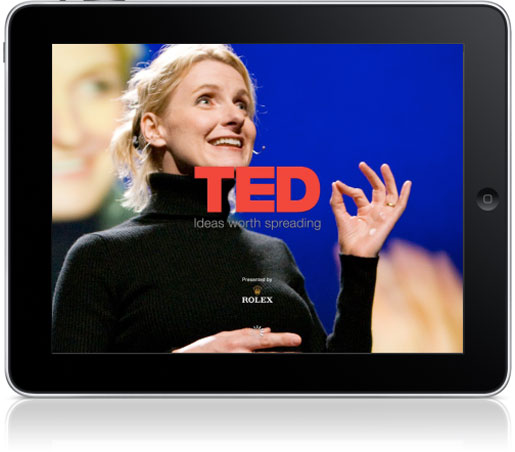
Today, TED releases the new TED iPad app, an innovative way to browse and watch TEDTalk video. The app redesigns the TED experience for the touchscreen, offering some cool iPad-only features for exploring, saving and watching.
The iPad app, which is the first official mobile app released by TED, lets viewers browse our almost 800 TEDTalks, running from 3 minutes to 30 minutes long, on a wide range of topics. The app is free and can be downloaded through the App Store in iTunes.
“The iPad presents a thrilling new platform for delivering a TED experience,” said June Cohen, Executive Producer of TED Media. “We rethought the user experience to take advantage of the portability, the touchscreen and the focused media time people have when they travel or settle in for an evening. We think TED fans will particularly love the “Inspire me” button, which creates a custom playlist to fill the exact amount of time they have free.”
The TED iPad app features include:
+ “Inspire Me” button. Touching this icon reveals an elegant watch face and the question: “How much time do you have?” Dial up a time, choose the type of talk you want (Inspiring? Funny? Jaw-dropping?) and you’ll get a playlist of talks that fits your schedule.
+ “Themes” serves up curated playlists of TEDTalks around topics such as “The Power of Cities,” “How We Learn,” “A Greener Future” and “Unconventional Explanations.”
+ “Tags” breaks down TEDTalks topics into some 250 categories, from “insects” to “robots,” from “happiness” to “fish.”
“Saved Talks” allows you to download and queue up several hours of TEDTalks for viewing offline anytime.
+ “Playlist Browser” lets you browse ahead in any playlist while watching a saved talk. It’s accessible by tapping the Info button.
The TED iPad app was developed by Matt Drance, a former Application Frameworks Evangelist at Apple who worked on the first iPhone SDK. He now works with the firm BookhouseSoftware. Read TED’s Q&A with Matt Drance >>
This first generation of the app does not yet support downloadable subtitles, but support for this feature on the iPad and on TED.com is in the works. A version of this app optimized for iPhone/iPod will be released in the first quarter of 2011.
Rolex, the supporting partner for the TED iPad app, figures prominently in the app’s “Inspire Me” feature, which evokes a watch face as it asks viewers “How much time do you have?”
The TED iPad app is available in Apple’s iTunes Store today for free. Download here >>
Discuss this Blog Post
-
-
Oct 15 2010
I’m a bit surprised to see the first mobile app is for an Apple iPad.
Surely Android (open source) is more in keeping with TED ideology.
-
Oct 15 2010
I think you’ll find TED policy matches Apple’s so-called walled-garden more closely than you think: http://www.ted.com/pages/view/id/185
-
Oct 15 2010
Interesting. This is the first time I’ve felt less than totally happy with TED (if you exclude a TEDx Barcelona conference that was painfully lightweight). Until now TED’s been my all time favourite website. (I’m a website consultant so I see a LOT of websites.) Have to say they slipped down a notch or two. Bad TED.
-
-
Oct 15 2010
Craig, you’re drinking the Kool-Aid. Android is open in so much as the carriers and manufacturers can modify it in ways that can be equally consumer unfriendly as friendly. See recent shananignas by Verizon, Motorola, & HTC. Don’t tarnish Ted with your rose colored notion of what Android represents.
In any event, thanks TED for this great iPad app. I’m loving it. Looking forward to your continued support of iOS. As well as your, no doubt, upcoming support for Android, RIM and others.
-
Oct 18 2010
“you’re drinking the Kool-Aid”
An interesting comment from an Apple fanboy.
-
-
-
Oct 15 2010
So, is there an API people could use to roll out their applications?
I wish we had something like the TED app on the Android… -
Oct 16 2010
I’ve mixed feelings. An official TED app is great but why only for the iPad? The iPod touch and the iPhone both deserve such an app.
-
Oct 16 2010
This iPad app is really amazing… Thanks… Also I’d like this app has the lenguages option (translations)….
-
Oct 18 2010
TED’s been my all time favourite website. (I’m a website consultant so I see a LOT of websites.)
-
Oct 21 2010
“An interesting comment from an Apple fanboy.”
That’s it Craig? That’s all ya’ got. Depressingly unintelligent discourse.
-
Oct 22 2010
Two questions: 1.) on the iPad TED app, why isn’t there a simple search tool that lets me search a speaker’s name like “Bill Gates”? I can’t believe that I have to “search” using tags. Second question: how do I remove a previously Saved Talk? I am surprised its not obvious as to how to do this in the user interface.
-
Oct 22 2010
I will ask my questions (posted yesterday) again! Why were my questions deleted by the moderator? What a crock of crap. Seriously, I had two questions about the TED iPad app that were very reasonable questions: 1.) Why can’t I search in the app on the name of a presenter i.e., “Bill Gates”? and 2.) How do I DELETE a previously Saved Talk? What type of elitist community is TED to erase these two questions that I posted to this forum yesterday? By the way, the TED iPad definitely has some bugs: a.) sometimes the video and audio just refuses to play (even if the presentation has been downloaded as a Saved Talk) and b.) one of the presentations I have been trying to download never completes the download process even though the progress bar moves left to right all the way to the right (it just hangs there and consumes power cycles and eats up teh iPad’s battery charge … if I re-launch the app it starts again from the beginning). Please TED, don’t be such an elitist community as if it can do no wrong — you have bugs in your iPad app :-)
-
Dec 4 2010
I am enjoying my TED Ipad app immensely. Does anyone know how to remove TED videos from your Ipad after you download them?
-
Dec 12 2010
Hit “edit” in upper right corner of saved talks page. Then click on the x over the talks you wish to delete. When you are finished tap on “done” which has replaced the edit button in upper right corner.
-cheers
-
-
Dec 8 2010
This is my most launched app on my iPad since i downloaded it.
waiting for the upcoming update with the (Search & Delete Saved Talks) features :DThank you TED <3
-
Dec 12 2010
Great start to the app! However, I would like to be able to save more videos for offline viewing.
In response to the few posts I saw about deleting saved talks, in order to delete them hit “edit” in the upper right hand corner of the saved talks page. This will bring up some small x boxes over the talks in which you can then click to delete them. Hope that helps.
-
Dec 29 2010
Thanks for the app. I would like to mention a few things that don’t work for me….
1. I want to stop downloading a talk, I couldn’t find a way to cease download.
2. Hitting the cog icon shows me that I can theoretically select a low quality version, but the is greyed out, with no explanation why it’s not working.
3. I usually watch TED lectures via iTunes podcast. What I want to use the app for is sending my friends links. Please add the ability to share talks with others via the app.
Thanks for all the great work to date.
-
Apr 12 2011
Hello!
I’m enjoying your app for iPad very much! However there is something that’s confounding me about the app. I’ve downloaded many talks so I have somethng stimulating to watch during my commute.However, suddenly I’m not able to download any more talks, I keep getting a message saying I’ve downloaded the maximum allowed downloaded talks and I should delete some before I can download more.
First of all, why would there be a maximum to the talks I can download? I can’t see a reason, except maybe to protect my iPad from exploding with too many stimulating information ;)
Second, when I then comply (as if I have a choice, I need my TED fix) and delete a few talks, I keep getting the message that I’m maxed out.Help please? I love the app, love the talks, but am getting quite frustrated with this particular issue.
Thnx!
-
Apr 13 2011
Hi Marcus — I’m doing some troubleshooting on an iPad now to see if I can’t replicate the issue. My guess is FAR too much stimulating info, and the little guy just needs a break :-).
I’ll email you shortly and see if we can’t get this sorted out! -
Apr 13 2011
Hello again Marcus – I think we’ve figured it out here at TED HQ, try updating to the lastest version of the app in the App Store (and update to the latest version of iOS). There was a limit on the amount of downloads previously, and you may have stumbled across a bug there with it not recognizing that you deleted. The newest version is only limited by the amount of space on your iPad.
Enjoy!
-
Apr 15 2011
Will, I’ve just downloaded the newest version of the Ted iPad app today. I’m also running the latest iOS version 4.3.2 and experience the same limitation. I’m currently using a 64GB iPad with 24.6GBs free. It seems to be giving me the “maximum number of talks available for offline viewing.” message with only 12 talks stored offline. Any thoughts?
-
May 18 2011
Hi Austin — can you email media[at]ted.com? I’d love to help troubleshoot this. Thanks!
-
-
Apr 15 2011
Installed the iPad app last night and it worked great, I enjoyed watching quite a few great talks. Today however, I cannot get any audio on talks, video yes, but no sound! Audio works on everything else on my iPad still, so I am at a loss to know what is going on. Has anyone else had these issues?
-
Apr 15 2011
Just to keep you all apprised, this is the e-mail I sent back to Will:
Hi Will,
Thanks so much for your quick reply! :)
I think I have the latest version of the TED app installed (there’s no update available) and my iPad OS is the latest version 4.3 as well.
Unfortunately I keep getting the same message:
“Save Talk
You have saved the maximum number of talks available for offline viewing. Remove some talks from your Saved Talks to save more.
View Saved Talks”I guess the weirdness has not dissipated yet ;)
-
Apr 15 2011
I have been troubleshooting & have found the audio only works when my headphones are attached. Weirdly, in expanded view, the video controls with the audio volume slider appear on tapping the screen whilst playing a talk, but once you unplug the phones, the volume slider part of that GUI disappears. Is this some sort of weird bug specific to my iPad2 or has anyone else experienced these difficulties?
-
Apr 20 2011
Sound issue appears to be a peculiarity of the iPad2. I reset the side switch to ‘mute’ then back again & it appeared to fix the problem (sharing this in case anyone has similar issues). This is strange as I never ever used that switch for anything but the ‘lock screen rotation’ function. It also doesn’t explain why the sound worked in some applications but not TED! Weird.
-
May 10 2011
Thank you Cameron. This fixes my problem (and also brings back the sound for my Angry Bird ;-) I guess this might be a bug in the “side switch” setting.
-
-
Apr 20 2011
Hi Will, haven’t heard from you yet. Is there any word on the issue of the saved talks? As I’ve stated above and in my e-mail (and as stated by Austin Ginder) I have the lates versions of the app and iPad OS, but i keep getting the error… Please help! :)
-
Apr 21 2011
Hi there. I am having the same issue with saving talks. I have the latest app version and latest iOS software, but no matter how many talks I delete I still can’t save new talks.
Please help -
Apr 24 2011
Is there a way to create your own playlists, or flag your favorites so you can watch them again later? Also, it would be nice to add email as one of the share options, so I could forward links to specific people.
-
Apr 27 2011
Hi Will,
Can I see video presentation with Russiah subtitles?
I found some presentation with subtitles (http://www.ted.com/talks/lang/rus/patricia_ryan_ideas_in_all_languages_not_just_english.html).
How can I tune subtitles? -
May 18 2011
Hi All — if you are running into this issue with the max amount of downloaded talks, please email media[at]ted.com, so I can track and respond better! Thanks – Will
-
Aug 12 2011
I would be nice the app keep track of the watched videos so it can show you the videos you still have left to see.
-
Sep 24 2011
Excellent app, as everything TED, but I wish I could connect with my TED account, so that I can keep syncronized my favorites talks. Thank you!
-
Oct 14 2011
I love the TED app and listening to interesting videos during my weekly business trip flights. In the past two weeks, however, I am no longer able to view the videos offline on the plane. When I click on a video from my “Saved Talks” list, it takes me to the specific page for that video, and when I click to play, it tries to connect to the Internet. And then I receive a message that I need Internet connection. Any thoughts on how to troubleshoot this? Thanks!
-
Nov 17 2011
Hi Ellen — This was a bug with the download manager in version 1.6.1 that affected talks downloaded within a certain time frame. If you update the app now (to 1.6.2) and re-download the talks this should stop happening. Sorry for the inconvenience!
-
-
Nov 6 2011
Sorry if this has already been asked, but is there a way of linking my saved ‘favourites’ on my ted.com account, with my saved talks / favourites on the iPad and iPhone app?
-
Nov 17 2011
I’m getting the same bug as Ellen. Saved a talk (it seems to have downloaded; took about 75mb of my storage), hit click to play and it’s telling me: No Internet Connection, You appear to be offline – try again later. Which would be a pretty funny response for an offline player to make if it wasn’t so infuriating.
Ipad2: ios 5.0.1 TED app downloaded about 2 weeks ago. Anyone?-
Nov 17 2011
Hi Steve — This was a bug with the download manager in version 1.6.1 that affected talks downloaded within a certain time frame. If you update the app now (to 1.6.2) and re-download the talks this should stop happening. Sorry for the inconvenience!
-
-
Nov 24 2011
There seems to be a problem with the iPad in saving talks for offline viewing. This comment has also been made in the feedback in the AppStore.
When I download talks to my iPod touch, no problems. When I download to my iPad, talks appear to download slowly and, if I switch apps or put my ipad in sleep mode before talks are completed downloading, it appears to increment the counter and rarely is a download completed (the red download bar fills, but the talk does not become available for offline viewing). So far the only solution *appears* to be downloading one talk at a time, not switching apps and preventing sleep mode before it’s complete. Quite frustrating, when it has worked perfectly on the iPod.
Any one else encountering this, or have any solution?
-
Nov 24 2011
After upgrading to IOS 5, my saved talks were lost. It asked me to remove or download. Some were successful, some were not (about 4 ex 14). So I removed the rest and tried to resave them from scratch. When I tried to save, they appeared in the saved talks but were clearly not there. Trying to save again said they were already saved. Can you fix this bug or tell me a work around?
-
Dec 14 2011
+1 for introducing a sync feature to iOS apps. Would be great to be able to login to our TED accounts on our mobile device(s) and access ‘favourited’ talks.


Brendan Mitchell
Hi guys, was really looking forward to using this, I have all the TED presentations downloaded via iTunes and watched most of them, but thought this would be a great way to refresh my memory on some of them… unfortunately it’s not running on my iPad. opens OK, but as soon as I click a video the app quits. I’ve tried again after a reboot and the same happens. FYI, I’m an iApp developer myself, so not I’m not running the current public iOS, I’m running 4.2 build (8C5091e) on an iPad 3G 32G. sorry my comment isn’t more positive, but I thought you’d rather get this feedback here rather than on the appstore, at least you can make note of it then delete this comment, happy if you do. I will install 4.2 beta 3 in a few days, so maybe that will solve the issue, if so I’ll let you know